- There are 3 mic cables coiled in the left shallow cupboard behind the band, labelled A, B & C. (I usually connect them left to right as I view the stage, but not necessary).
- These 3 cables plug into 3 of the first 5 inputs to the stage box. They are labelled on the stage-box and mixer with vocalists’ names. If the name is not there, chose any of the 5 not being used.
- Obviously, on the mixer use the channels you have patched into on the stage box and mute the others from the 5 Vox channels.
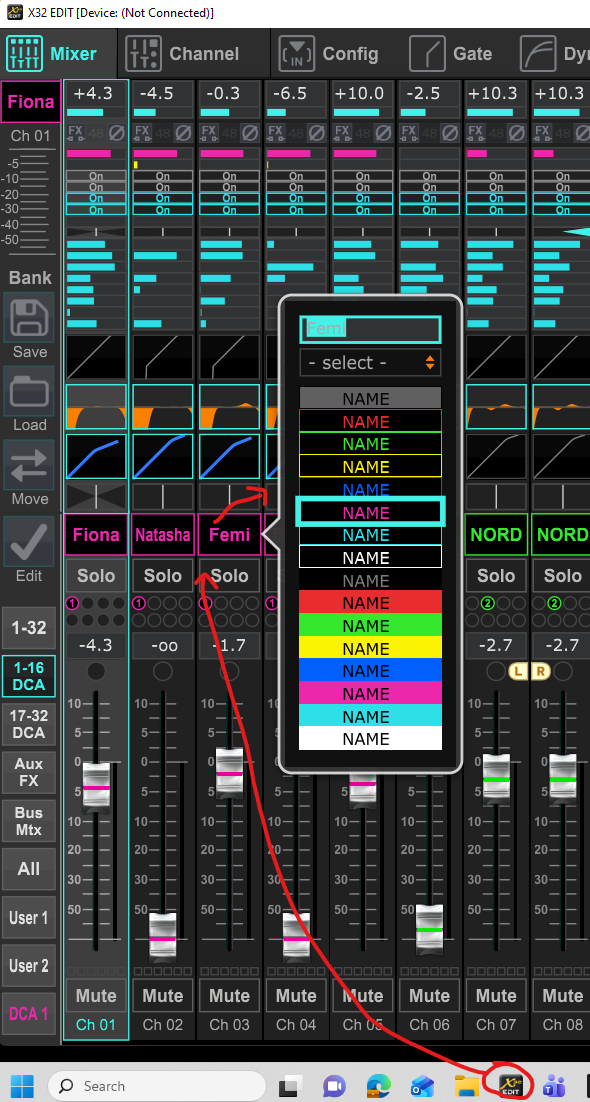
- If you need to rename a Vox channel (i.e. you have a singer who is not matching the label), the easiest way to do this is to run the XEdit program on the PC above the desk (there is a shortcut on the taskbar, button of screen). Once the program opens and the channel names are displayed, right-clicking on one of them allows you to rename the channel – press Enter button to save the change.
- Editing the name not only helps you know which fader to adjust but also the band who are using the monitor mixing app for their in-ear mix.
- If you have more than 3 vocalists, just patch their mic cable directly into the stage box – I don’t think we are likely to have more than 5, but the fallback then would be the stick radio mics!